
WEEX Live mode: Monitor 20 trading pairs at once and trade like a pro
By: WEEX|2026/06/22 11:18:00
0
Share
TL;DR
- Monitor up to 20 crypto pairs simultaneously—scroll, drag, and trade without switching tabs.
- Full TradingView suite with Market, Order Placement, Order Book, and Positions modules.
- One-click toggle between Traditional layout (in-depth analysis) and Live mode (multi-pair monitoring).
- Smart, non-intrusive guides for new users—skip when you're ready.
- Built for pro traders, swing traders, and streamers who need speed and context.
WEEX Live mode: Trade 20 pairs at once like a professional desk trader
Why is your old workflow costing you money?
Every time you close a chart to check another pair, you risk missing a breakout. Every second spent navigating menus is a second not spent reacting to the market.
Professional desk traders don't work that way. And now, neither do you.
WEEX is introducing our desktop Live mode—a multi-screen trading layout that lets you monitor 20+ coins simultaneously, execute orders instantly, and switch between analytical and live views with one click. WEEX Live mode transforms your browser into a pro-grade command center—built for multi-coin strategies, fast scalping, and live streaming.
Stop switching tabs. Start catching every move.
4 core upgrades that change how you trade
1. Multi-coin parallel monitoring—20 pairs, one screen
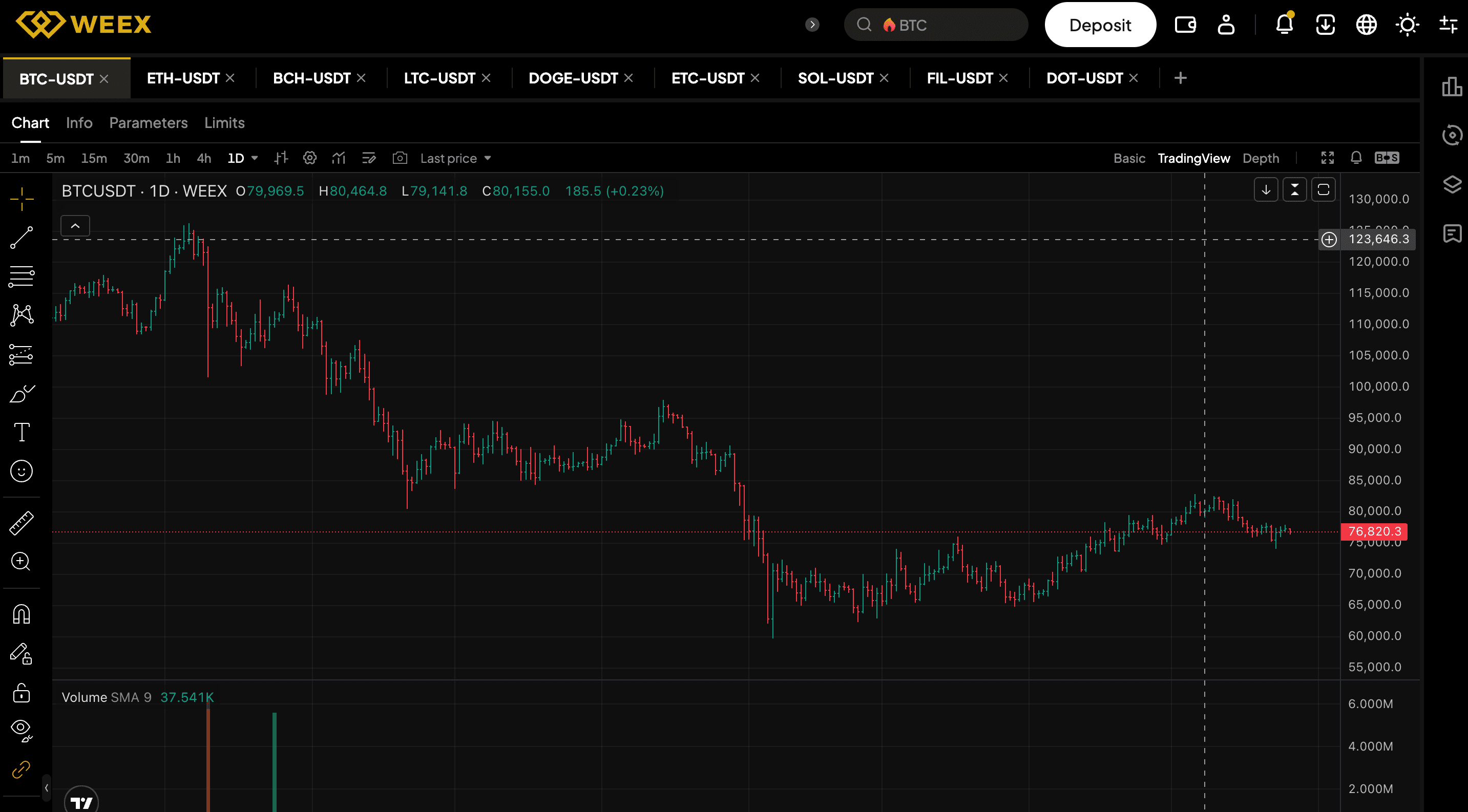
Stop losing entries to tab-switching, WEEX Live mode puts 20 pairs on one screen, scrollable and reorderable.
- Rich chart tools: Annotations, position display, quick order entry.
- Smart pair switching: Close one pair, the next loads instantly without lag.
- Perfect for arbitrage, basket trading, and multi-coin strategies.
Never lose visual context. View the whole market at a glance.
2. Immersive TradingView charts—four modules, one click away
Too much information clouds your judgement; too little leaves your trades in the dark.
In the right sidebar, WEEX Live mode provides four modules that show only what you need, when you need it.
- Market: Select filters and live data (mark price, 24h change, volume, funding rate).
- Order entry: Place your orders without leaving the chart. The order entry panel shows order types and critical futures info (margin token, max leverage, mark price) at a glance.
- Order book: Review the depth chart and recent trades in one fixed layout.
- Positions: Manage positions in real-time without leaving the chart.
All the data you need, none of the clutter—four modular tools in the right sidebar keep you sharp and fast.

3. One-click toggle for fast switching between traditional and Live mode layouts
One layout can't handle both deep analysis and live monitoring—so WEEX gives you two modes with one toggle.
- Traditional layout: For deep single-coin analysis.
- Live mode: For multi-coin monitoring and rapid decisions.
Seamlessly switch between research mode and execution mode without rebuilding your workspace.
4. Smart feature guides—help when you need it, zero noise when you don't
New users can feel lost, while experienced users hate pop-ups. WEEX delivers context-aware, one-time guides that help without the hassle.
- Traditional layout: Four steps (settings, order book, depth chart, quick order)
- Live mode: Three steps (multi-coin tabs, chart area, sidebar)
- Only shown to new users or inactive accounts (can be skipped or dismissed after an action)
No more feeling lost; no more annoying pop-ups. Just smart, one-time guidance for every trader.
Who gets the most from WEEX Live mode?
Although designed for everyone, the following three types of traders may find WEEX Live mode most helpful:
Type | Benefit |
Professional traders | Monitor multiple pairs for arbitrage & strategy execution |
Swing traders | Track promising coins and wait for the perfect entry |
Streamers / Signal providers | Show multi-coin markets live, explain your logic in real time |
Monitor multiple pairs, catch the perfect entry, and explain your logic live—all from one screen.
How to start using WEEX Live mode
- Log into WEEX
- Open a futures page
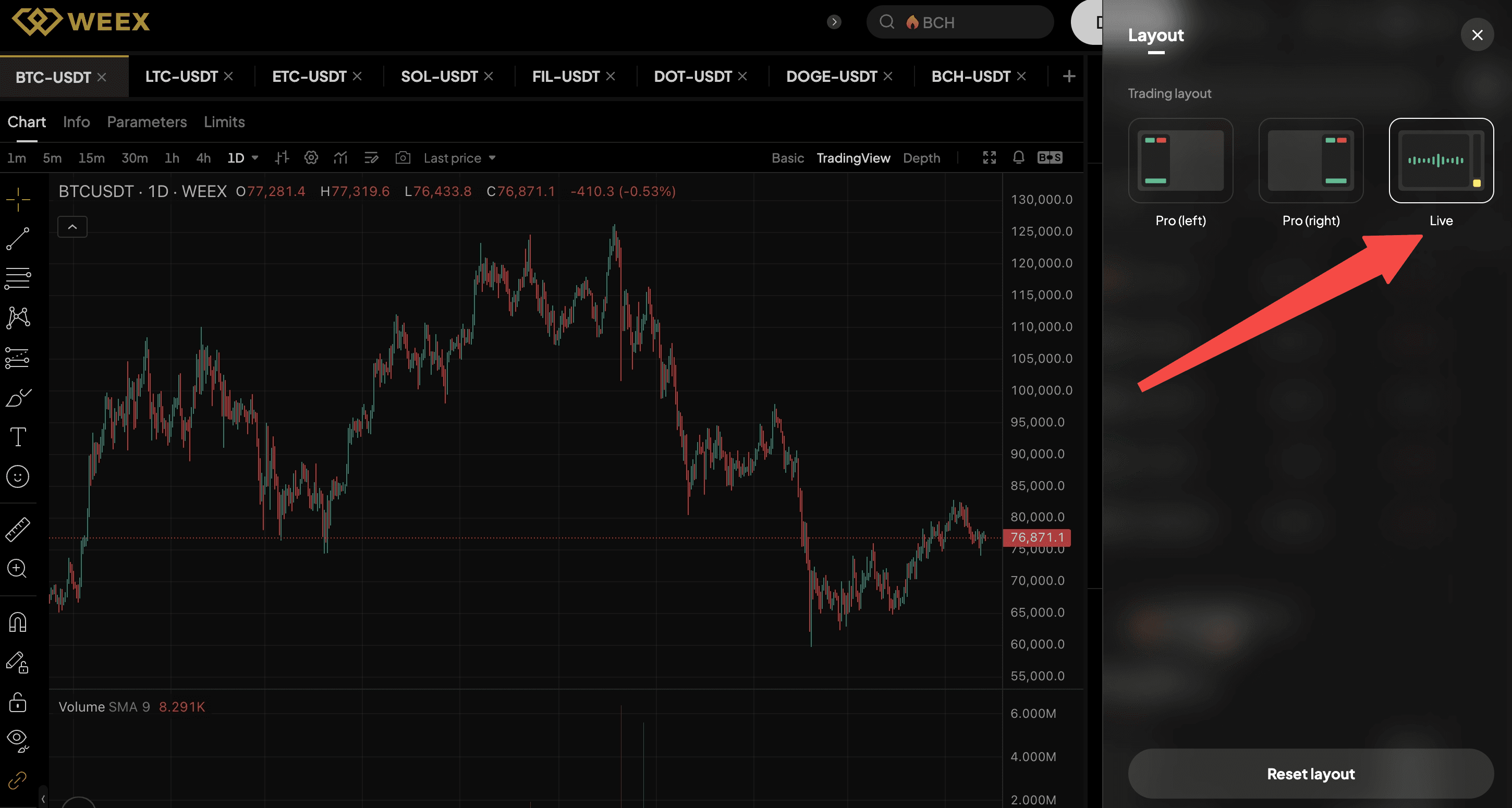
- Click the "Layout" button in the top right corner
- Choose Live mode
Trade smarter. See wider. React faster.
WEEX Live mode isn't another feature.
It's a new way to see the market—built for the way professional traders actually think.
Try WEEX Live mode now. No extra cost, no complicated setup. Just faster, smarter multi-coin trading.
You may also like

WEEX Makes Affiliate Access Easier on the Web and in the App
WEEX now provides a smoother way to access affiliate-related pages on the web and in the app. Users can find the Affiliate entry more easily and go to the right page based on their login and affiliate status.

Customize Your Spot Trading Page: Drag Modules and Move the Order Panel Where You Want It
Set up your WEEX Spot trading page around the way you trade. Drag supported modules, show or hide key panels, move the order panel to the left or right, and use “Reset layout” at any time to return to the default setup.

WEEX App Just Got Smarter – New Tabs for Faster Trades & Easy Asset Management
Discover WEEX App’s new trading tabs: Futures, TradFi, Copy Trade (users)/ Elite Trade (lead traders) on the same page. Solve messy navigation, find opportunities faster, and manage all trades in one place.

WEEX All-New Search Features: Find, Trade & Earn Faster Than Ever
Supercharged search is here! Discover WEEX’s upgraded Search features with hot events, new listings, live market sentiment, and one-click trading. Trade smarter, seize every opportunity.

Meet the new WEEX trial fund—your gateway to greater profits
Discover WEEX's new trial fund and trade with less risk. Use them to offset transaction fees, funding fees, and trading losses. Kickoff your trading journey with WEEX!
WEEX Deposit/Withdrawal Dynamic Island: Your Asset Status, Always in Sight
WEEX introduces Deposit and Withdrawal Info on Dynamic Island for iOS. See fund transfer progress on your dynamic island, lock screen, or while using other apps. No more guessing. No more refreshing.
Get Paid to Onboard? Try WEEX’s New Homepage with Rewards for Registration, Deposit & Trade
WEEX just launched a brand new homepage and a 3-step new user onboarding guidance. Complete Registration → Deposit → Trade to earn exclusive rewards. Faster navigation, clear progress, and instant bonuses. Download the latest WEEX App to try it now.

WEEX Custom Layout: Build Your Perfect Trading Workspace in Seconds
WEEX introduces custom layout on futures trading page: left/right panel switch, hide/show core modules, full-screen focus, and one-click reset. Trade your way now.

See “Buy Walls” & “Sell Walls” Instantly: WEEX Launches the Depth Chart for Smarter Trades
Spot market liquidity at a glance. WEEX’s new Depth Chart shows you buy/sell walls, support & resistance levels, and order book depth. Perfect for large orders and scalping. Try it now on WEEX Futures.

What Is Quick Trade on WEEX? 2 Ways WEEX Ends Chart-Panel Jumping
WEEX has launched the quick trade features on futures trading, allowing you to place orders directly on the price axis. No more switching panels. 4 order units supported. Live on WEEX Futures Web.

Guaranteed Price Now Live on WEEX: Execute with Greater Precision
To deliver a smoother futures trading experience, WEEX futures has launched a "Guaranteed Price" feature.

Deposit Smarter & Faster: Discover WEEX’s Powerful Upgrade for Crypto and Fiat Deposit
Tired of slow, complicated crypto deposits? WEEX has completely upgraded the process.

WEEX New Navigation: Trade Faster, Find Trends, Copy Top Traders Instantly
TL;DRYou can now discover trending trading pairs faster with dedicated Spot and Futures themes.The platform automatically resumes your last viewed trading pair so you never lose your place.Simply hover over Copy Trade to see top-performing traders from the past three weeks.This upgrade is rolling out now to all WEEX users. Trading Slows You Down? Here’s How We Fix ItEvery tap, scroll, and menu click steals seconds from your trading. Missed trends. Lost progress. Hidden copy traders. Scattered asset views. That’s why WEEX rebuilt the top navigation — to remove every speed bump. Now you can catch trending pairs before they run, pick up exactly where you left off, find top-performing copy traders in one hover, and check your wallet without digging through menus. Less friction, faster decisions. 5 Navigation Boosts That Make You Trade SmarterHere’s what changed and why it matters for your daily trading:Trending Spot & Futures themes: Switch market themes and spot high-momentum pairs instantly. No more hunting.Auto-resume last pair: WEEX remembers your last viewed pair. Come back anytime, keep trading.One-hover copy trader discovery: Hover over Copy Trade to see top 3-week traders. Click into their pages instantly.Wallet shortcut in main navigation: One click to check balances, deposits, and withdrawals.Combined language & currency selector: View and switch both settings together. Personalize in seconds. Who Gets the Biggest Speed Gains?Everyone wins, but high-frequency and copy traders see the biggest efficiency jump.New traders learn faster — clean layout and visible copy trading lowers the barrier.Active spot & futures traders save minutes per session with auto-resume and trending filters.Copy trading followers find top performers in one hover instead of multiple clicks.Frequent asset movers love the Wallet shortcut for quick deposits and balance checks.Find New Navigation Features in Two ClicksHere's how you can find the new navigation features on WEEX homepage within a few clicks:Log in and look at the top bar (Spot, Futures, Copy Trade, Wallet, globe icon).Hover Copy Trade → see top 3-week traders.Click Spot or Futures → your last viewed pair loads automatically.Click the globe → switch language and currency side by side.Click Wallet → view all assets instantly. Start Trading Smarter — It’s Live NowThese upgrades are available now. No settings to enable. No extra cost.👉 Try the new WEEX navigation nowTrade faster. Miss less. WEEX. Thank you for trading with WEEX About WEEXFounded in 2018, WEEX has developed into a global crypto exchange with over 6.2 million users across more than 150 countries. The platform emphasizes security, liquidity, and usability, providing over 1,200 spot trading pairs and offering up to 400x leverage in crypto futures trading. In addition to the traditional spot and derivatives markets, WEEX is expanding rapidly in the AI era delivering real time AI news, empowering users with AI trading tools, and exploring innovative trade to earn models that make intelligent trading more accessible to everyone. Its 1,000 BTC Protection Fund further strengthens asset safety and transparency, while features such as copy trading and advanced trading tools allow users to follow professional traders and experience a more efficient, intelligent trading journey.Follow WEEX on social mediaX: @WEEX_OfficialInstagram: @WEEX ExchangeTiktok: @weex_globalYoutube: @WEEX_OfficialDiscord: WEEX CommunityTelegram: WeexGlobal Group

WEEX P2P now supports KES—Merchant Recruitment Now Open
To make crypto deposits easier, WEEX has officially launched its P2P trading platform and continues to expand fiat support. We're excited to announce that the Kenyan Shilling (KES) is now available on WEEX P2P!
WEEX P2P now supports COP—Merchant Recruitment Now Open
To make crypto deposits easier, WEEX has officially launched its P2P trading platform and continues to expand fiat support. We're excited to announce that the Colombian Peso (COP) is now available on WEEX P2P!
Track Markets At a Glance: New WEEX Price Widgets for iOS & Android
To streamline your market data access, WEEX has officially launched "Market Watchlist" desktop widgets
Major Upgrade on Web: 10+ Advanced Chart Styles for Deeper Market Insights
To deliver more powerful and professional analysis tools, WEEX has rolled out a major upgrade to its web trading charts—now supporting up to 14 advanced chart styles.

Auto Earn Bonus 2026: WEEX vs Binance vs Bybit vs OKX vs Kraken (Only 1 Pays Extra)
Auto Earn 2026: Binance? Bybit? No extra bonus. Only WEEX gives +0.5% + 300% APR referral. Limited-time. See exactly how much more you can earn.
WEEX Makes Affiliate Access Easier on the Web and in the App
WEEX now provides a smoother way to access affiliate-related pages on the web and in the app. Users can find the Affiliate entry more easily and go to the right page based on their login and affiliate status.
Customize Your Spot Trading Page: Drag Modules and Move the Order Panel Where You Want It
Set up your WEEX Spot trading page around the way you trade. Drag supported modules, show or hide key panels, move the order panel to the left or right, and use “Reset layout” at any time to return to the default setup.
WEEX App Just Got Smarter – New Tabs for Faster Trades & Easy Asset Management
Discover WEEX App’s new trading tabs: Futures, TradFi, Copy Trade (users)/ Elite Trade (lead traders) on the same page. Solve messy navigation, find opportunities faster, and manage all trades in one place.
WEEX All-New Search Features: Find, Trade & Earn Faster Than Ever
Supercharged search is here! Discover WEEX’s upgraded Search features with hot events, new listings, live market sentiment, and one-click trading. Trade smarter, seize every opportunity.
Meet the new WEEX trial fund—your gateway to greater profits
Discover WEEX's new trial fund and trade with less risk. Use them to offset transaction fees, funding fees, and trading losses. Kickoff your trading journey with WEEX!
WEEX Deposit/Withdrawal Dynamic Island: Your Asset Status, Always in Sight
WEEX introduces Deposit and Withdrawal Info on Dynamic Island for iOS. See fund transfer progress on your dynamic island, lock screen, or while using other apps. No more guessing. No more refreshing.


Customer Support:@weikecs
Business Cooperation:@weikecs
Quant Trading & MM:bd@weex.com
VIP Program:support@weex.com
